Quarterly Newsletter
Getting started with Tyler Insurance Filings
Instructions for new and existing insurance companies
Published: October 22, 2025
Getting started with Tyler Insurance Filings is designed to be simple and straightforward. The platform is built to help insurance companies manage required filings efficiently and securely. Whether an insurance company is setting up access for the first time or adding new staff members to an existing account, the steps below explain how the process works.
It is important to note that enrollment is limited to insurance companies. Motor carriers cannot create accounts directly. Instead, filings for motor carriers must always be submitted by the insurance company on their behalf. This approach ensures filings are accurate, properly authorized, and consistent with regulatory requirements.
Government agencies interested in receiving and reviewing insurance filings using Tyler Insurance Filings' secure online system should contact us to discuss next steps.
New Insurance Companies
Insurance companies that have not previously used the website must begin by requesting an account.
- Submit a Request — Complete the Insurance Company Signup form with company information, including primary contact details, and execute the participation agreement.
- Verification — The request is reviewed to confirm that the company meets eligibility requirements.
- Account Creation — Once approved, a company account is established and login credentials are issued to the designated administrator.
- Account Setup — The administrator will set up filing companies for the account (i.e., insurance companies for which users can create filings), as well as authorized signers (individuals permitted to sign filings on a company's behalf).
- User Setup — The administrator is then responsible for adding staff members who will need access. These individuals will submit required insurance forms to state agencies. Admin users should ensure each individual has a unique email address and uses unique credentials.
Existing Insurance Companies
Companies with an existing account do not need to create a new one. Instead, additional staff members and filing companies can be added under the existing company profile.
- Administrator Contact — The company's account administrator serves as the point of contact for granting new access.
- User Profile Creation — The administrator creates a profile for each new staff member within the company account by using the Add/Delete Users feature.
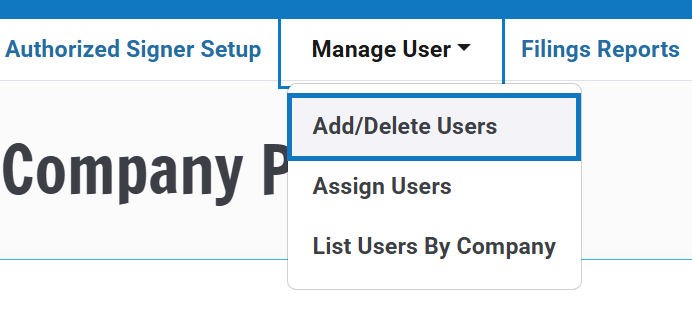
- Login Credentials — Once a profile has been created, the new user receives login details and can begin using the website in accordance with the permissions assigned.
- Other Account Updates — Administrators can add or edit filing company and authorized signer information to ensure the most accurate and up-to-date information is submitted with each filing.
Questions regarding account setup, eligibility, or account management can be directed to the support team at support@tylerinsurancefilings.com or 703-841-6374. Clear account management helps ensure secure access for insurance companies while streamlining the filing process on behalf of motor carriers.