Quarterly Newsletter
Answering six of our users' most common questions from 2025
Important reminders on authentication, filings, and agency processing
Published: January 15, 2026
As the Tyler Insurance Filings platform continues to evolve, we are seeing a consistent set of questions from users navigating day-to-day filing activity. Many of these questions come up repeatedly and reflect common points of confusion rather than one-off issues.
To help clarify expectations and reduce avoidable delays, we have pulled together the six most common questions from 2025 along with guidance and links to additional educational resources.
How do I log in during the transition to multifactor authentication (MFA)?
We are currently rolling users over to MFA with all users required to use MFA in early 2026. During this transition period, the login experience can look different depending on whether your account has already been migrated.
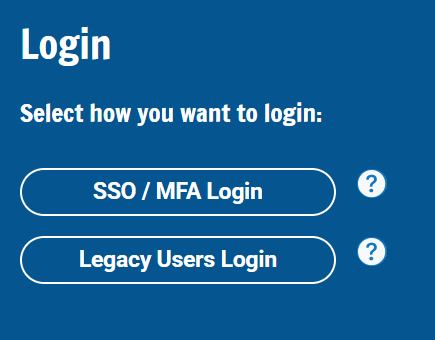
For now, users will see two login options:
- One for non-MFA users or legacy accounts
- A new login screen for users that have completed transition to MFA or single sign-on
Once your account has been moved to MFA, you must use the MFA login screen. Attempting to log in using the legacy login option will not work for MFA-enabled users, even if your username and password are correct.
Because MFA requires verification through a secondary device each user must complete authentication using a cell phone, which helps protect account access and ensure compliance with security best practices.
Users are reminded to verify that they are using the correct login option. A screenshot is included below for reference.
Why was my filing rejected?
Filing rejections can be frustrating, but in most cases, they are caused by small details that can be corrected and avoided in future submissions. Agencies review filings carefully and even minor discrepancies can result in a rejection.
The most common reasons we see include:
- Misspelled applicant or legal business name
- Missing, incomplete, or incorrect Doing Business As (DBA) name
- Missing, incomplete, or incorrect state ID number
- Submitting a filing before the policyholder has applied for authority to operate in the state
- Policy information that does not match agency records
- Duplicate filings submitted through multiple methods
Many rejections happen not because the filing itself is incorrect, but because the information does not exactly match what the agency already has on file. Taking a few moments to verify spelling, DBA names, identification numbers, and authority status can prevent unnecessary delays.
We have covered the most common rejection reasons ‐ and how to avoid them ‐ in detail here.
If I submit a filing electronically, do I still need to print and mail it?
No. If a filing is submitted electronically through our system, you should not print and mail a paper copy.
There are two options available for electronic filing:
Direct electronic submission to state agencies
Twenty-two states accept filings directly through electronic submission. When a filing is submitted electronically to these agencies through our system, mailing a paper copy afterward can result in the filing being flagged as a duplicate. You can see the breakdown of states that accept electronic filings here.
Electronic submission via cloud fax
For states that support cloud fax, users can opt-in to electronically submit filings via electronic fax. This is optional and available in eight states: Kansas, Nevada, North Dakota, Ohio, Rhode Island, Virginia, Vermont, and West Virginia. Once you choose cloud fax and submit the filing the transmission is handled electronically ‐ no printing, signing, or mailing is required.
To avoid unnecessary rejections or delays, it is important to understand which states support cloud fax, which accept direct electronic submissions, and which still require paper filings. A full breakdown by state is available on the product map which outlines the submission method used for each jurisdiction.
How long does it take for a filing to be approved?
Processing times are determined entirely by the reviewing state agency and can vary significantly by jurisdiction, volume, and internal review procedures. While many filings are reviewed within a few business days, this time frame is not guaranteed.
Once a filing is submitted, it is placed into the agency's review queue. At that point, the review process is dependent on agency procedures, and approval times may be affected by factors such as agency staffing levels, peak filing periods, holidays, or additional verification requirements.
Users are encouraged to submit filings as early as possible to allow sufficient time for agency review and to avoid delays related to effective dates, authority requirements, or required notification periods, such as advance notice for policy cancellations.
Can I edit a filing after it's been submitted?
No. Once a filing has been submitted, it cannot be edited or altered within the system. This applies even if the filing is still pending review with the agency.
If an error or typo is discovered, such as a misspelled name, missing DBA name, or incorrect policy information, a new, corrected filing may be required. If the original filing was accepted by the agency, a cancellation notice (such as a Form K or MCP-66) may need to be filed first before submitting the corrected filing depending on agency rules.
Is a web service available and how do we get started?
Yes. A web service is available for users who want to integrate filing activity directly into their internal systems or workflows. This service allows certain filings and data to be submitted programmatically, reducing manual entry and supporting higher volume or automated processes.
Web service functionality varies by state and filing type, and setup requirements may differ depending on the integration. A list of supported states and forms appears in our web service documentation. Users interested in using the web service should contact customer service to discuss availability, setup requirements, and next steps.
Many of the most frequently asked questions stem from ongoing changes to authentication methods, filing requirements and workflows, and agency review processes. Understanding how these updates affect system access, electronic submission, and filing corrections can help reduce delays and improve overall filing outcomes.
In 2026, we are launching a knowledge center that will serve as a centralized and searchable resource for users to read and reference information about Tyler Insurance Filings. It will include articles designed to answer common questions, explain filing workflows, and provide additional program details. Additional details and guidance can be found in the knowledge center.
For questions that require additional clarification or assistance with specific filings, contact our support team at support@tylerinsurancefilings.com.